


#BuildingInPublic – the platform story so far
In August 2025 we released v2.0, which brought together a lot behind-the-scenes stability and security improvements that we introduced to the hosted·ai platform earlier this year.
We consider that to be our first stable release, and we generally have a monthly release cycle – so from now on, we’ll talk each month about new features in the platform, and what’s coming next.
New to hosted·ai? Learn more about our GPU cloud platform or get in touch for a demo.
We’re excited to announce the availability of hosted·ai version 2.0.1, with some great new features that make GPUaaS easier, more flexible, AND more profitable. Let’s get into it!
#BuildingInPublic – the platform story so far
In August 2025 we released v2.0, which brought together many stability and security improvements introduced to the hosted·ai platform during the year. We consider that to be our first stable release, and we generally have a monthly release cycle – so from now on, we’ll talk each month about new features in the platform, and what’s coming next.
New to hosted·ai? Learn more about our GPU cloud platform or get in touch for a demo.
GPU security + performance optimization
hosted·ai handles GPU very differently to other platforms. Our GPU control plane enables up to 100% GPU utilization by combining individual GPUs into pools, and allowing the resources of the entire pool to be shared with multiple tenants at once (that is the basis for hosted·ai’s dramatic improvement in GPU unit economics).
The hosted·ai platform has an extremely efficient task scheduler that context-switches tasks in and out of physical GPUs in the pool – but, how is this scheduling controlled?
Introducing… the new GPU optimization slider.
When a GPU cloud provider creates a pool, they assign GPUs to that pool and choose the sharing ratio (i.e., how many tenants you can sell the pool’s resources to). For any setting above 1, the new optimization slider becomes available.
Behind this simple slider is a world of GPU cloud flexibility. The slider enables providers to configure the shared GPU pool to suit different customer use cases:
- Optimized for Security: temporal scheduling is used. The hosted·ai scheduler switches user tasks completely in and out of physical GPUs in the pool, zeroing the memory each time. At no point do any user tasks co-exist on the GPU. This is the most secure option, but comes with more performance overhead.
- Optimized for Performance: spatial scheduling is used. The hosted·ai scheduler assigns user tasks simultaneously to make optimal use of the GPU resources available. There is no memory zeroing. This is the highest-performance option, but it doesn’t isolate user tasks – they are allocated to GPUs in parallel.
- Balanced: temporal scheduling is used, but without fully enforced memory zeroing. This provides a blend of performance and security.
Why is this important?
Service providers need the flexibility to handle any mix of heterogeneous workloads. That’s just as true for GPUaaS as it is for traditional IaaS cloud and hosting.
Your GPUaaS needs to cater to a range of price/performance targets for different AI model training, tuning and inference use cases, as well as customers in simulation, gaming, research and so on.
The hosted·platform enables you to configure your infrastructure and services accordingly:
- Creating pools of different GPU classes
- Configuring the sharing, security and performance characteristics of each pool
- Configuring pricing and other policies for each pool
- Enabling customers to subscribe to any mix of pools for different workloads
Self-service/end user enhancements
Also in this release, some handy improvements for end users running their applications in your hosted·ai environments:
Service exposure
We’re made it easier to expose ports for end user applications and services through the hosted·ai admin panel (and coming soon, through the user panel).
Now your customers can choose how they present their application services to the outside world, through configurable ports.
More self-service GPU resource management
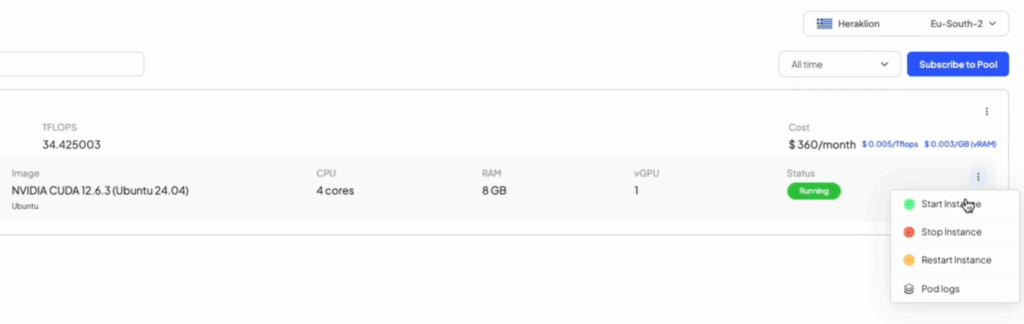
We’ve added new management tools for your customers too. Each GPU resource pool they subscribe to can be managed through their user panel, with visibility of the status of each pod; the ability to start, stop and restart pods; and logs with information about the applications using their GPU.
Why are these things important?
These enhancements are part of our mission to make GPUaaS as fast, easy and frictionless as possible for your end users (also, nobody should be forced to use CLI to do deep K8s management when they just want to restart a service)
Furiosa integration
In July 2025 we announced our partnership with Furiosa, a semiconductor company specializing in next-generation AI accelerator architectures and hardware. We’ve been working bring Furiosa device support to hosted·ai and this is now available in v2.0.1.
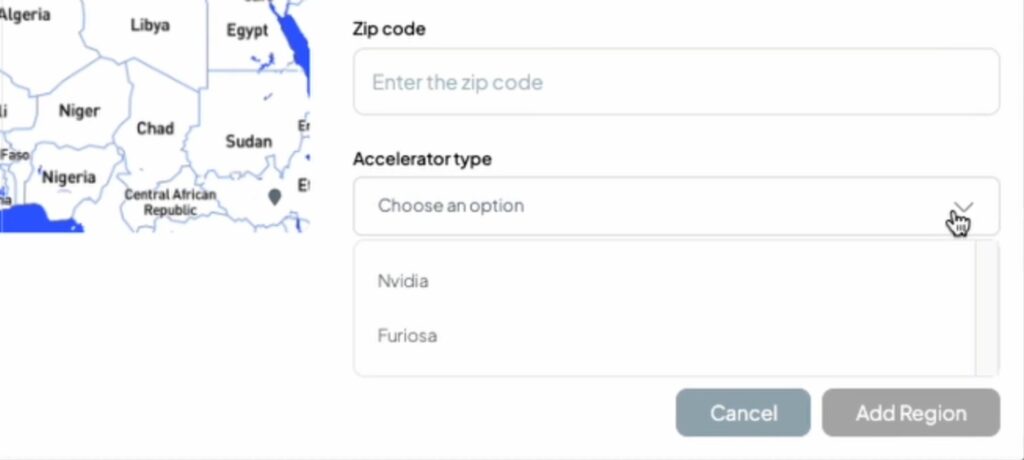
Now service providers can create regions with clusters based on Furiosa, as well as NVIDIA. Once a region has been set up for Furiosa cluster, it can be managed, priced and sold using the same tools hosted·ai makes available for NVIDIA – and in future, other accelerator devices.
Why is this important?
Furiosa’s Tensor Contraction Processor architecture is designed to maximize performance per dollar and per watt for generative AI workloads. The hosted·ai platform is designed to be accelerator-agnostic to give service providers flexibility in the AI infrastructure they build and sell. It’s all about flexibility to meet different use cases at different price/performance points.
More information:
- Check out the full release notes for hosted·ai v2.0.1
- New to hosted·ai? Get in touch for a chat and/or demo
Coming next:
In final testing now – subscribe for updates:
- Full stack KVM – complete implementation, replacing Nexvisor
- Scheduler credit system – expanding GPU optimization with a credit system to delivers consistent performance for inference in mixed-load environments
- Billing enhancements – more additions to the hosted·ai billing and metering engine – more ways to monetize your service
- Infiniband support